Minesweeper Logic Puzzle
Reviews
Description
Game Introduction
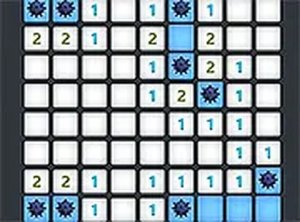
Minesweeper Logic Puzzle is a classic logic puzzle that has been a staple of personal computing for over twenty years. The core objective is to uncover all safe squares on a grid while avoiding hidden mines. Players use numbers on revealed squares to deduce mine locations, combining reasoning and deduction. This online version brings the timeless gameplay to your browser with updated graphics and sound, offering a clean and engaging experience for players of all ages. It is a perfect way to exercise your brain during short breaks. The game has been enjoyed by millions worldwide and remains a popular choice for those seeking a mental challenge that is both relaxing and stimulating. Its simple premise hides a deep layer of strategic thinking, making it accessible to newcomers while still offering depth for experienced players.
How to Play
To play, click or tap on a square to reveal it. Revealed squares show numbers indicating how many mines are adjacent. Use this information to logically determine where mines are located. Right-click or long-press to flag a square as a mine. The goal is to mark all mines without uncovering any. The game supports both touchscreen on mobile devices and mouse or keyboard on desktop, making it accessible across platforms. Start with easier puzzles and gradually increase difficulty for a greater challenge. The controls are intuitive and responsive, allowing for smooth gameplay on any device.
Game Features
Features include classic logic puzzle gameplay with updated graphics and sound. It is playable on both mobile and desktop devices without any download required. Full screen mode is available for a more immersive experience. Multiple difficulty levels from beginner to expert allow players to progress at their own pace. The game improves logical thinking and provides a satisfying challenge without being overwhelming. Its clean design and smooth controls make it easy to pick up and play. The interface is designed to be clutter-free, focusing the player's attention on the puzzle itself.
Tips for Success
Start with easier puzzles to learn the deduction patterns. Pay close attention to numbers and use them to identify safe squares and mines. Practice regularly to improve your speed and accuracy. Use flagging to mark suspected mines, but only when you are confident. If stuck, take a break and return with a fresh perspective. Gradually increase the difficulty level to continue challenging your reasoning skills. The key is logical deduction rather than guessing. Over time, you will develop intuition for common patterns, making even expert puzzles manageable.








Comments
Sign in to comment
You must be logged in before posting a review or rating.
No account? Create one
No comments yet. Be the first to comment!