Tetrix Classic Block Puzzle
Reviews
Description
Game Introduction
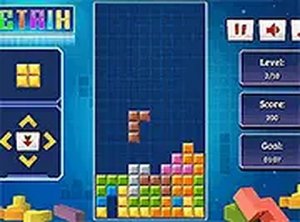
Tetrix Classic Block Puzzle is a browser-based arcade game that recreates the traditional block-stacking experience. Players control falling geometric shapes as they descend into a vertical grid. The main goal is to rotate and position each piece to form complete horizontal lines. When a line is filled, it disappears from the screen, earning points and creating more space for upcoming blocks. The challenge is to prevent the stack of blocks from reaching the top of the playing field. This game is designed for quick play sessions or longer periods of focus. It runs smoothly on any device without requiring any installation or downloads. The simple yet engaging mechanics make it suitable for players of all ages who enjoy strategic thinking and quick reactions.
How to Play
In Tetrix Classic Block Puzzle, players guide falling blocks as they move downward. The objective is to rotate each piece and move it horizontally to fit into the existing stack. Once a horizontal row is completely filled with blocks, it clears away. Players typically use keyboard controls on desktop computers, such as arrow keys for movement and rotation. On mobile devices, touch or swipe gestures are used for the same actions. A preview of the next block is shown, allowing players to plan their placements. The game continues until blocks pile up to the top of the screen, leaving no room for new pieces. The speed of falling blocks increases over time, adding to the challenge.
Game Features
Tetrix Classic Block Puzzle includes core features that define this type of puzzle game. The difficulty gradually increases as the game progresses, with blocks falling faster. The interface is clean and focused on the essential gameplay. Full-screen mode is available for an immersive experience. The game is optimized for both desktop and mobile browsers, ensuring smooth performance on various devices. As an HTML5 game, it requires no installation and works across different operating systems. The scoring system rewards players for clearing multiple lines at once, encouraging strategic placement. A preview of the next block helps with planning.
Tips for Success
To improve in Tetrix Classic Block Puzzle, practice rotating and placing blocks quickly. Watch the upcoming block preview to plan where to fit pieces. Try to keep the stack level to avoid uneven surfaces that make placement difficult. Clearing multiple lines at once yields higher scores, so look for opportunities to create gaps for long straight pieces. As the speed increases, stay calm and focus on making efficient moves. Regular practice will help you react faster and achieve higher scores over time.









Comments
Sign in to comment
You must be logged in before posting a review or rating.
No account? Create one
No comments yet. Be the first to comment!