Dungeon of Dalogus: Pixel Quest
Reviews
Description
Game Introduction
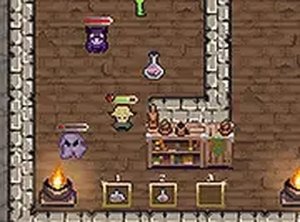
Dungeon of Dalogus: Pixel Quest is a free browser-based adventure game that places you in a locked dungeon with no memory of your past. Your only path forward is to explore deeper into the crypt, facing various obstacles and creatures that block your escape. The game offers a solo mode for a personal challenge and a co-op mode where a second player can join to help overcome challenges and collect helpful items. This free browser game combines nostalgic pixel art visuals with engaging gameplay that requires both strategy and quick thinking. Each room presents new dangers and opportunities to gather useful items, making every playthrough unique. The goal is to navigate all rooms, complete the final encounter, and find the exit. With its accessible controls and rewarding progression, Dungeon of Dalogus provides a satisfying experience for players who enjoy classic dungeon exploration games.
How to Play
To play Dungeon of Dalogus: Pixel Quest, use your desktop computer with a keyboard and mouse. Move your character using the arrow keys or WASD. Interact with obstacles and collect items by clicking the mouse or using designated keys on the keyboard. Collect useful items such as health boosts and equipment by walking over them. In co-op mode, a second player can join using additional controls to assist you. The objective is to explore every room, complete the final challenge, and find a way out. The game runs directly in your browser and supports full screen for a more immersive experience. There are no complicated setups or downloads required, so you can start playing immediately.
Game Features
Free to play. Pixel art style. Co-op mode for two players. Item collection including health boosts and equipment. Challenging dungeon rooms with various obstacles. Browser-based with full screen support.
Tips for Success
Dungeon of Dalogus: Pixel Quest offers a straightforward yet engaging adventure that respects your time. The pixel art style is charming, and the co-op option makes it easy to share the fun with a friend. It is a solid choice for a quick gaming session.
Compatibility
Faq
Recommended Games

Color Path Runner: Quick Match Game

Shadow Operatives: Strategic Puzzle Missions
Rotating Platform Guardian

Arena Tussle 3D Casual Game

Clue Seeker: Avenue Puzzle

Rubber Road Reflex Drive
Blockpost Arena Challenge
Stickman Survival 3D Challenge

Mech Champions Arena Battle Game
Comments
Sign in to comment
You must be logged in before posting a review or rating.
No account? Create one
No comments yet. Be the first to comment!