Pastel Block Jump Arcade
Reviews
Description
Game Introduction
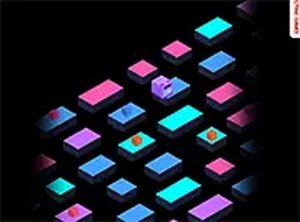
Pastel Block Jump Arcade is an endless jumping game where players guide a pastel-colored block across roads of moving platforms. The core objective is to keep the block from falling between platforms or running off the screen. The block moves forward automatically, and players must time their jumps to land safely on blocks that slide in opposite directions. The black background makes the colorful blocks stand out, helping players focus on timing. The game tracks both the best and most recent score, encouraging players to beat their personal record. No tutorial is needed, so players can start immediately. This game offers a safe and relaxing arcade experience suitable for players of all ages.
How to Play
To play, click or tap the screen to make the block jump. The block moves forward automatically, so players only need to time their jumps to land on the moving platforms. Watch the direction of the blocks carefully and plan moves to avoid falling into the gaps. The game is straightforward and intuitive, making it accessible for players of all ages. With practice, players will improve their ability to judge distances and timing. The controls are simple and responsive, allowing players to focus on the rhythm of the platforms.
Game Features
Pastel Block Jump Arcade offers endless gameplay that keeps players coming back for more. The pastel 3D graphics are easy on the eyes and create a calm visual style. One-click controls make the game simple to play on any device. It is mobile-friendly and works well on touchscreens. The game is free to play with no downloads required. A full screen mode is available for an immersive experience. The game includes a scoring system that tracks best and most recent attempts, adding a layer of personal challenge.
Tips for Success
To improve performance, focus on watching the movement patterns of the platforms before jumping. Practice timing clicks or taps to land precisely in the center of each block. Try to maintain a steady rhythm, as rushing often leads to mistakes. Pay attention to the gaps between platforms and plan jumps ahead. Regular practice will help develop a better sense of timing and distance. Remember that each session is different, so stay patient and learn from each attempt.







Comments
Sign in to comment
You must be logged in before posting a review or rating.
No account? Create one
No comments yet. Be the first to comment!