Spider Solitaire Classic Puzzle
Reviews
Description
Game Introduction
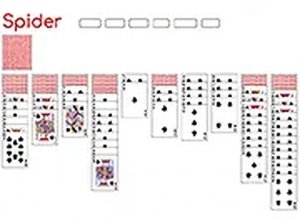
Spider Solitaire Classic Puzzle is a free online card game that challenges players to arrange all cards into descending runs from king down to ace within the same suit. The game is played with two decks of cards, and the objective is to clear the board by building eight complete sequences. Players can click on the top card to release a new deck and then carefully organize their cards. This timeless puzzle is perfect for unwinding or sharpening the mind. Available directly in a browser without any downloads, it offers a seamless experience for both beginners and seasoned players. The game provides endless fun and a satisfying sense of accomplishment as you clear the board. Its classic mechanics have made it a favorite among card game enthusiasts for decades.
How to Play
To play Spider Solitaire Classic Puzzle, players start by arranging the cards on the table in descending order from king to ace, all in the same suit. Players can move entire sequences if they are in order. Clicking on the top card of the deck deals a new row of cards. An undo button is available for players who need to rethink their moves. The game ends when players have successfully built eight complete sequences from king to ace. The game can be played on desktop or mobile devices for a seamless experience.
Game Features
Spider Solitaire Classic Puzzle is free to play and requires no downloads. It features a mobile-friendly design and full-screen mode for an immersive experience. The game offers endless replayability with random deals, ensuring that no two games are the same. Players can enjoy the game directly in their browser, making it accessible from any device with an internet connection.
Tips for Success
Focus on creating empty columns early to give yourself more flexibility. Plan your moves ahead to avoid getting stuck. Use the undo feature to experiment with different strategies. Practice regularly to improve your card sequencing skills. These tips will help you clear the board more efficiently and enjoy the game to its fullest.








Comments
Sign in to comment
You must be logged in before posting a review or rating.
No account? Create one
No comments yet. Be the first to comment!